
Logpoint users with User Account Administrator and Logpoint Administrator access can manage SAML Authentication users.
To manage the SAML Authentication users:
Go to Settings >> User Accounts from the navigation bar.
Click Users.
In Plugin Users, click SAML Authentication. It lists all the SAML Authentication users who have logged into Logpoint.
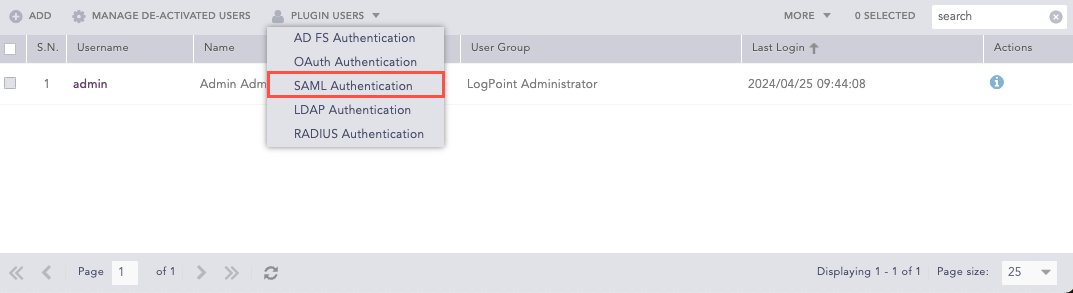
Plugin Users
Click the De-Activate User icon in Actions to deactivate a user.
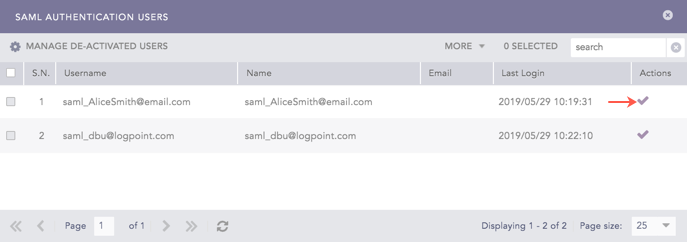
De-Activate SAML Authentication Users
Click Yes.
Enter your credentials and click Ok.
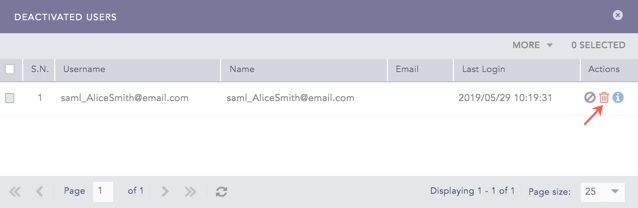
Click Manage De-Activated Users to delete or activate the de-activated users.
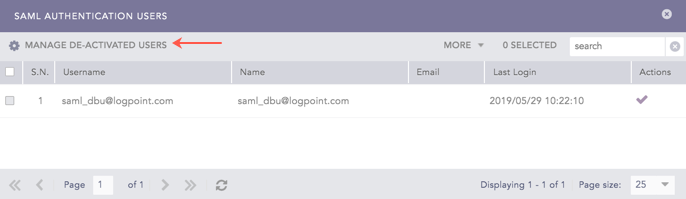
Manage De-Activated SAML Authentication Users
Click the Activate icon or the Delete icon to activate or delete the de-activated user.
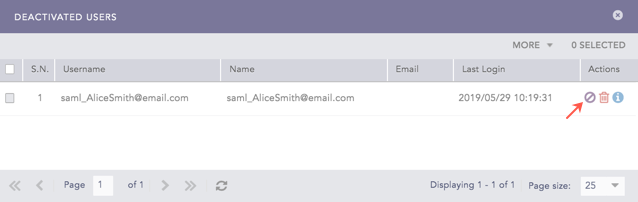
Activate the De-Activated SAML Authentication User
Delete the De-Activated SAML Authentication User